


 Get 0.05 TON 💎
Earlier Versions
| Name | Size | Uploaded | Game Version | Downloads | |
| v1.0.1 release | 6.01 KB | Dec 27, 2014 | 6.0.3 | 702 |  Download Download |
| v1.0.0 release | 6.02 KB | Dec 27, 2014 | 6.0.3 | 66 | Download |
| v0.9.10 release | 6.04 KB | Dec 27, 2014 | 6.0.3 | 94 | Download |
| v0.9.9 release | 5.71 KB | Dec 27, 2014 | 6.0.3 | 65 | Download |
| v0.9.0 release | 3.67 KB | Dec 26, 2014 | 6.0.3 | 50 | Download |
| v0.8.0 release | 3.66 KB | Dec 26, 2014 | 6.0.3 | 70 | Download |
| r20141226071036 alpha | 3.60 KB | Dec 26, 2014 | 6.0.3 | 43 | Download |
| r20141226070857 alpha | 3.60 KB | Dec 26, 2014 | 6.0.3 | 31 | Download |
| r20141226070729 alpha | 3.59 KB | Dec 26, 2014 | 6.0.3 | 37 | Download |
Screenshots
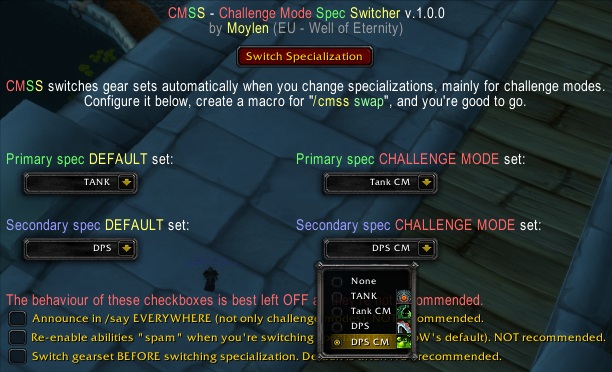

Description
When doing challenge modes it's useful to be able to quickly swap specializations and gear sets between trash packs and bosses.
It's also useful to tell the group when you're done switching specializations and are therefore ready for the pull.
This addon does that, and more, for you:
- removes the abilities spam in the chat window whenever you change specs
- when in challenge modes, uses /say to tell the party you're switching specs, which spec, and when you're done switching specs
- equips a configured gearset after you've switched specialization
- you can configure two gearsets per specialization: default, and for challenge mode only
- provides an easy slash command to quickly switch specialization
You can now configure the addon via ESC -> INTERFACE -> ADDONS!
But if you really like typing commands, read on…
Example setup, assumes you have already equipment sets by the same name:
/cmss primary default Healer
/cmss primary cm Healer CM
/cmss secondary default DPS
/cmss secondary cm DPS CM
and then..
/cmss swap

CMSS: Swiched to equipment set "Healer".
Type "/cmss gear secondary default SET NAME" to configure,
When in challenge mode, instead:
/cmss swap

CMSS: SWITCHING SPEC TO Subtlety.
[Moylen]: {cross} ===> Starting to switch spec to Subtlety <=== {cross}
CMSS: SWITCHED SPEC TO Subtlety.
CMSS: Swiched to equipment set "SUBCM".
Type "/cmss gear primary default SET NAME" to configure
You cheer!
[Moylen]: {skull} ===> Switched spec to Subtlety <=== {skull}





Add a comment