


 Get 0.05 TON 💎
Earlier Versions
| Name | Size | Uploaded | Game Version | Downloads | |
| GoldCoffer-v1.3.0.zip release | 38.72 KB | Mar 3, 2023 | 10.0.5 | 166 |  Download Download |
| GoldCoffer-v1.2.5.zip release | 38.81 KB | Feb 16, 2023 | 10.0.5 +2 | 312 | Download |
| GoldCoffer-v1.2.4.zip release | 39.52 KB | Jan 23, 2023 | 10.0.5 +3 | 522 | Download |
| GoldCoffer-v1.2.3.zip release | 39.52 KB | Jan 14, 2023 | 10.0.2 +3 | 434 | Download |
| GoldCoffer-v1.2.2.zip release | 35.87 KB | Dec 1, 2022 | 10.0.2 | 423 | Download |
| GoldCoffer-v1.2.1.zip release | 35.55 KB | Nov 16, 2022 | 10.0.2 | 286 | Download |
| GoldCoffer-v1.2.0.zip release | 34.71 KB | Nov 10, 2022 | 10.0.0 | 203 | Download |
| GoldCoffer-v1.1.0.zip release | 32.37 KB | Oct 26, 2022 | 10.0.0 | 234 | Download |
| GoldCoffer_v1_0_2.zip release | 31.99 KB | Sep 10, 2022 | 9.2.7 | 98 | Download |
| GoldCoffer_v1_0_1.zip release | 31.96 KB | Sep 9, 2022 | 9.2.7 | 61 | Download |
| GoldCoffer_1_0.zip release | 31.97 KB | Sep 8, 2022 | 9.2.7 | 20 | Download |
Screenshots
Description
GoldCoffer
Track WoW gold across your account.
What it Does:
As you log into your characters this addon saves the gold they poses. When you gain or loose gold the total will be updated.
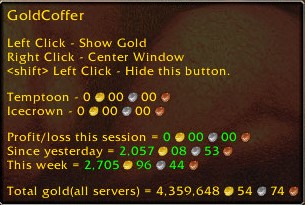
You can mouse over the minimap button to get some totals and help information.
There are 6 tabs across the bottom of the GoldCoffer window.
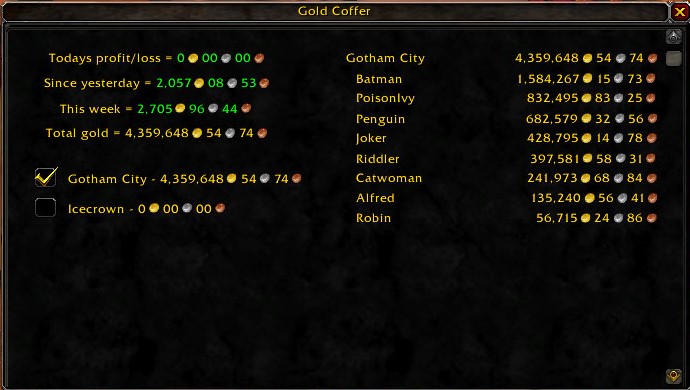
- Gold Report
The left side of this tab lists the servers you have characters on and the amount of total gold on the server. Checking a box on the left side will give you a detailed list of each character on that server and the gold that they have.
- Gold Summery
List the gold you had on the account at various times over the past
- Daily History
Lists the last 50 days you were in game in 3 columns listing the date, your total gold and the change over the previous day.
- Weekly History
Lists the last 50 Weeks you were in game in 3 columns listing the date, your total gold and the change over the previous day. The week begins on the weekly reset date (I think this is correct for any region).
- Yearly History
Lists the last few years (if you had this addon recording the data) again like above listing date, gold and gain/loss.
- Currencies *NEW*
The left side lists the currencies, subdivided and grouped like they are on the currency tab in game. Clicking on a currency will give you a list on the right side of all characters with that currency and the amount they have.
Tracking can only be done on a single account. If you have more than one account there isn’t an easy way to combine the data.
Commands:
/goldcoffer or /gc
Opens the report window.
/gc mm or /gc button
Shows of hides the minimap button.
/gc c or /gc center or /gc centre
Center the report window.
/gc t
Print your total gold.
/gc s
Print the total gold on your current server.
/gc delete server toon
Deletes a toons data(not the toon). Useful if you name change, move servers ,a faction change or do anything else that makes a toon show up twice.
This can be undone by simply logging into the deleted toon.
/gc ?
Print command line help. This will also be shown if you type any parameter that is unknown.
Minimap Button:
Left Click
No modifier
Open the report Window
SHIFT key down
Hide this button
Right Click
Center Window
When mouse over icon
-
- Help. Shows the above commands.
- The gold currently owned by this character.
- Profit/Loss today.
- Profit/Loss Since yesterday.
- Profit/Loss This week.
- Total gold owned combining all servers
- The daily and weekly resets are the same time as the in game resets.



Add a comment