


 Get 0.05 TON 💎
Earlier Versions
| Name | Size | Uploaded | Game Version | Downloads | |
| 1.0.7 release | 112.20 KB | Jan 24, 2023 | 10.0.5 | 818 |  Download Download |
| 1.0.6 release | 112.20 KB | Oct 25, 2022 | 10.0.2 | 1,021 | Download |
| 1.0.5 release | 112.30 KB | Oct 13, 2022 | 9.2.7 | 516 | Download |
| 1.0.4 release | 112.00 KB | Aug 16, 2022 | 9.2.7 | 407 | Download |
| 1.0.3 release | 111.99 KB | Jun 8, 2022 | 9.2.5 | 351 | Download |
| 1.0.2 release | 112.01 KB | May 11, 2022 | 9.2.0 | 235 | Download |
| 1.0.1 release | 111.65 KB | Mar 18, 2022 | 9.2.0 | 280 | Download |
| 1.0.0 release | 111.66 KB | Mar 10, 2022 | 9.2.0 | 145 | Download |
Screenshots

Description
MiniMapLine Add-On
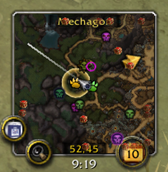
World of Warcraft’s minimap add-ons are great for showing you treasures, rares, and other custom icons; but all that content can make it hard to see which direction your character is pointing. With MiniMapLine, a line is added to to your minimap pointing in your current direction. You can customize the width of the line to make it as subtle or chonky as you desire.
Usage
- Install the Mini Map Line add-on using AddonsWoW or any other add-on manager.
- Customize the default thickness (2px) or opacity (0.4) in Options by using the
/mmlcommand.
Author
Created by Peter Wooley. Based on Greenwolf_Wildhammer’s great Red Arrow add-on
Add a comment