


 Get 0.05 TON 💎
Earlier Versions
| Name | Size | Uploaded | Game Version | Downloads | |
| QuickChat-3.0 release | 4.18 KB | Jan 14, 2020 | 8.3.0 | 137 |  Download Download |
| QuickChat-2.2 release | 4.18 KB | Nov 28, 2019 | 8.2.5 | 127 | Download |
| QuickChat-2.1 release | 3.82 KB | Nov 26, 2019 | 8.2.5 | 52 | Download |
| QuickChat-2.0 release | 3.74 KB | Nov 22, 2019 | 8.2.5 | 70 | Download |
| QuickChat-1.9 release | 3.65 KB | Nov 22, 2019 | 8.2.5 | 36 | Download |
| QuickChat-1.8 release | 3.57 KB | Oct 30, 2019 | 8.2.5 | 59 | Download |
| QuickChat-1.7 release | 3.58 KB | Oct 29, 2019 | 8.2.5 | 27 | Download |
| QuickChat-1.6 release | 3.53 KB | Oct 27, 2019 | 8.2.5 | 30 | Download |
| QuickChat-1.5 release | 3.45 KB | Oct 27, 2019 | 8.2.5 | 20 | Download |
| QuickChat-1.4 release | 3.08 KB | Oct 25, 2019 | 8.2.5 | 21 | Download |
| QuickChat-1.3.zip release | 3.08 KB | Oct 23, 2019 | 8.2.5 | 24 | Download |
| QuickChat-1.2 release | 3.07 KB | Oct 21, 2019 | 8.2.5 | 28 | Download |
| QuickChat-1.1 release | 3.08 KB | Oct 20, 2019 | 8.2.5 | 11 | Download |
| QuickChat-1.0 release | 3.07 KB | Oct 20, 2019 | 8.2.5 | 5 | Download |
Screenshots

Description
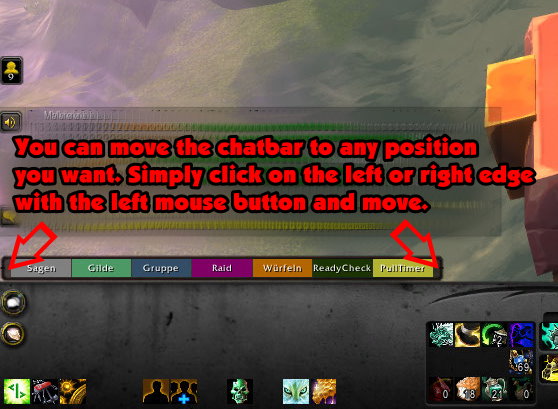
With the QuickChat Addon,
you no longer need to type the /s, /i, or similar commands into the chat to switch chat channels.
Now you just have to press a button and you change the channel.

The buttons Guild, Group, Raid, Instance and ReadyCheck are only visible if you are in a guild, group, raid or instance.
You can move the chatbar to any position you want. Simply click on the left or right edge with the left mouse button and move.
Add a comment