


 Get 0.05 TON 💎
Earlier Versions
| Name | Size | Uploaded | Game Version | Downloads | |
| SmartAuraWatch 7.0a release | 95.30 KB | Aug 17, 2016 | 7.0.3 | 1,841 |  Download Download |
| 6.0c release | 95.30 KB | Dec 3, 2014 | 6.0.3 | 2,067 | Download |
| 6.0b release | 95.19 KB | Oct 24, 2014 | 6.0.2 | 714 | Download |
| 6.0a release | 95.08 KB | Oct 17, 2014 | 6.0.2 | 443 | Download |
| 5.4b release | 96.44 KB | Oct 31, 2013 | 5.4.0 | 1,343 | Download |
| 5.4a release | 96.46 KB | Sep 13, 2013 | 5.4.0 | 555 | Download |
| 5.1a release | 95.23 KB | Dec 21, 2012 | 5.1.0 | 1,119 | Download |
| 5.0b release | 94.97 KB | Sep 1, 2012 | 5.0.4 | 1,036 | Download |
| 5.0a2 release | 94.90 KB | Aug 30, 2012 | 5.0.4 | 372 | Download |
| 5.0a release | 87.03 KB | Aug 29, 2012 | 5.0.4 | 300 | Download |
| 4.3a release | 94.74 KB | Nov 30, 2011 | 4.3.0 | 1,658 | Download |
| 4.2a release | 94.02 KB | Jun 30, 2011 | 4.2.0 | 827 | Download |
| 4.1c release | 93.98 KB | May 5, 2011 | 4.1.0 | 540 | Download |
| 4.1b release | 93.71 KB | May 2, 2011 | 4.1.0 | 286 | Download |
| 4.1a release | 93.79 KB | Apr 29, 2011 | 4.1.0 | 317 | Download |
| 4.0g release | 50.59 KB | Mar 24, 2011 | 4.0.6 | 525 | Download |
| 4.0f release | 41.01 KB | Mar 14, 2011 | 4.0.6 | 263 | Download |
| 4.0e release | 30.62 KB | Mar 4, 2011 | 4.0.6 | 268 | Download |
| 4.0d release | 27.33 KB | Feb 28, 2011 | 4.0.6 | 38 | Download |
| 4.0c release | 24.11 KB | Feb 22, 2011 | 4.0.6 | 36 | Download |
| 4.0b release | 23.37 KB | Feb 16, 2011 | 4.0.6 | 37 | Download |
| 4.0a release | 22.93 KB | Feb 10, 2011 | 4.0.6 | 95 | Download |
Screenshots

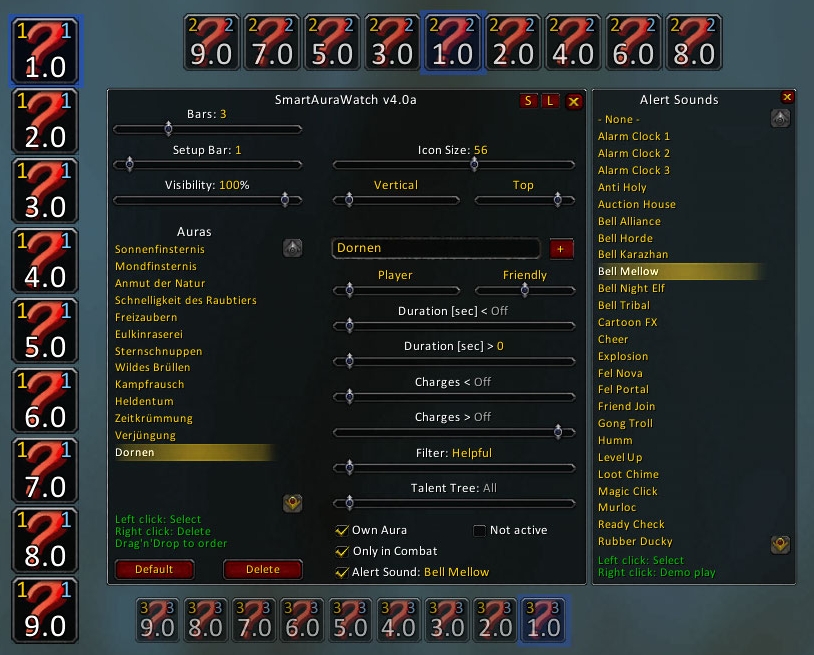

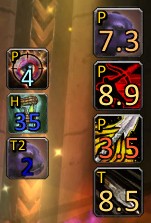
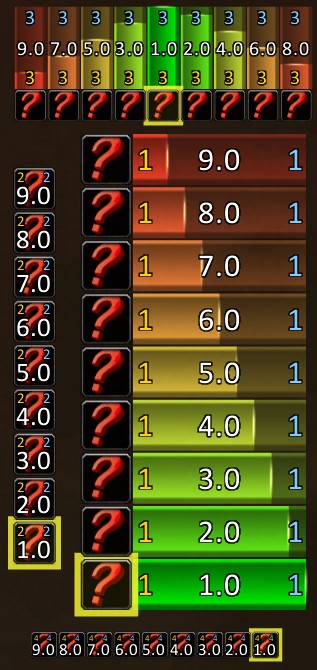

Description
SmartAuraWatch
Created by Aeldra (EU-Proudmoore)
The addon will notify you with an icon, time left, charges and target of the aura that has procced. It is possible to monitor several auras on different targets at the same bar.
It provides also a handy default set of proccs for each class.
Donate
– Features –
- Up to 9 bars
- Up to 9 icons per bar at the same time
- Powerful filter options for each aura
- Target Unit (Player, Traget, Focus, etc.)
- Aura Duration < and >
- Aura Charges < and >
- Harmful / Helpful / etc.
- Friendly / Enemy
- Talent Tree
- Not active check
- All the time or only in combat
- All or only own
- Alert sound
- Ease and slim setup
- Supports totems
- Supports temporary enchants
- Supports inventory cooldowns
- Supports all clients
- Supports ButtonFacade
- Supports up to 10 custom sounds (sound folder)
– FAQ –
Q1: How can I configure SmartAuraWatch?
A1: Type in the chat "/saw" or "/smartaurawatch" to open the options frame.
Q2: Why does my aura not show up?
A2: Please check the spelling, aura names are case sensitive.
Q3: Why does my aura not show up, when I it is not active, but the option is set?
A3: If the aura is added with the name and it is not a spell in your book, the icon is not available at creation time.
SmartAuraWatch updates itself when the aura is the first time active.
Q4: How can I move the bars?
A4: Open the options frame. One icon of each bar has a yellow background/boarder, this one can be moved.
Q5: Can I use the spell id?
A5: Enter the spell id in the textbox, press enter and if it is a valid id the name will be displayed.
Q6: Why does show a question mark for the aura in the options frame?
A6: If the aura is added with the name and it is not a spell in your book,
the icon is not available at creation time. SmartAuraWatch updates itself
when the aura is the first time active.
Q7: How can I change the font?
A7: Use the chat command '/saw f <font path>', example:
/saw f Interface\Addons\SharedMedia\fonts\impact.ttf
Q8: How can I monitor totems?
A8: Simply enter the totem name as aura name.
Q9: How can I monitor weapon buffs?
A9: Enter the item name or inventory slot name as aura name, like 'Main Hand', 'Off Hand', 'Thrown'.
The slot name is localized, so use the offical slot name in your language.
The filter is set per default to 'Enchant'.
Q10: How can I monitor inventory item cooldowns?
A10: Enter the item name or inventory slot name as aura name, like 'Trinket 1', 'Hand', 'Waist'.
The slot name is localized, so use the offical slot name in your language.
The filter is set per default to 'Cooldown'.
Q11: How can I add custom sounds?
A11: Put your custom sound files (up to 10) in the sound folder.
The rules:
1. The files have to be encoded as MP3
2. You MUST name the files as sound1.mp3, sound2.mp3 and so on.
If you do not follow these rules, they will NOT play!
– Chat –
Type /saw [command] or /smartaurawatch [command] in game
reset – Reset local settings to default
resetall – Reset ALL settings to default
o – Default orientation
is # – Default icon size #value (20-80)
g # – Default Growth #value (0-2)
v # – Default Visibility #value (0.0-1.0)
f <> – Default Font <font path>
fso # – Default font size offset #value (-20-20)
frs – Reset to default font
srs – Reset all Statistics
– To Do –
- Missing/incomplete translations (FR/ES/RU/koKR/zhTW)
- Complete default aura list for each class
Your help would be very appreciated 🙂
– Contact –
Please send me a mail or write a comment if you discover Bugs or have Suggestions.
aeldra@sonnenkinder.org
– Donations –
Donate



Add a comment