


 Get 0.05 TON 💎
Earlier Versions
| Name | Size | Uploaded | Game Version | Downloads | |
| TargetingIcons_Retail release | 9.67 KB | Jan 15, 2020 | 8.3.0 | 739 |  Download Download |
| TargetingIcons_Classic release | 9.67 KB | Jan 15, 2020 | 1.13.3 | 2,070 | Download |
| TargetingIcons_Retail release | 9.67 KB | Nov 25, 2019 | 8.2.5 | 271 | Download |
| TargetingIcons_Classic release | 9.67 KB | Nov 25, 2019 | 1.13.2 | 884 | Download |
| TargetingIcons_Classic release | 8.16 KB | Oct 25, 2019 | 1.13.2 | 711 | Download |
| TargetingIcons_Classic.zip release | 7.19 KB | Oct 14, 2019 | 1.13.2 | 364 | Download |
| TargetingIcons_V3.6 release | 6.87 KB | Oct 10, 2019 | 1.13.2 | 176 | Download |
Screenshots

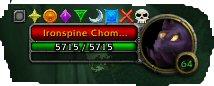
Description
This addon helps redesign how targets get marked in dungeons. Instead of having to go to 3 different dropdown menus to get a target symbol or open the side panel.
I put the symbols on a bar above your targets portrait to have easy access. The bar will show up as long as you are a raid leader/assist or anyone in a party. It will also show party/raid member names to tell them to cc a particular symbol, if you turn that option on.
I also added a feature that can be annoying in certain circumstances but is my favorite part. It defaults to off unless you wanted it on. Use '/ti options' to change the various options like locking the frames in place or if you do /ti skull on then it has a skull put on your target whenever you change targets(In combat). I designed this mostly for tanks since they are generally the ones marking targets. This basically helps focus fire on targets if you have multiples instead of all party members targeting multiple enemies.
To drag the frames make sure they are unlocked. The symbols bar can be dragged by clicking and holding just right of the skull icon. The names bar can be dragged by clicking and holding just right of the names between the scroll bar, now expanded a bit more for easier access.


Add a comment