


 Get 0.05 TON 💎
Earlier Versions
| Name | Size | Uploaded | Game Version | Downloads | |
| ZeraTooltip-2.7.2 release | 293.09 KB | Feb 19, 2023 | 3.4.1 +1 | 71 |  Download Download |
| ZeraTooltip-2.7.1 release | 293.08 KB | Feb 19, 2023 | 3.4.1 +1 | 31 | Download |
| ZeraTooltip-2.7.0 release | 293.08 KB | Feb 18, 2023 | 3.4.1 +1 | 37 | Download |
| ZeraTooltip-2.6.0 release | 292.64 KB | Feb 16, 2023 | 3.4.0 +1 | 48 | Download |
| ZeraTooltip-2.5.0 release | 233.20 KB | Feb 5, 2023 | 3.4.0 +1 | 70 | Download |
| ZeraTooltip-2.4.0 release | 231.25 KB | Nov 23, 2022 | 3.4.0 +1 | 134 | Download |
| ZeraTooltip-2.3.0 release | 217.55 KB | Oct 28, 2022 | 3.4.0 +1 | 121 | Download |
| 2.2.0 release | 212.00 KB | Oct 9, 2022 | 3.4.0 +1 | 150 | Download |
| 2.1.2 release | 202.78 KB | Sep 29, 2022 | 3.4.0 +1 | 755 | Download |
| 2.1.1 release | 202.65 KB | Sep 26, 2022 | 3.4.0 +1 | 115 | Download |
| 2.1.0 release | 202.11 KB | Sep 25, 2022 | 3.4.0 +1 | 119 | Download |
| 2.0.0 release | 196.00 KB | Sep 22, 2022 | 3.4.0 +2 | 572 | Download |
| 1.6.1 release | 162.53 KB | Jun 22, 2022 | 2.5.4 | 221 | Download |
| 1.6.0 release | 162.42 KB | May 20, 2022 | 1.14.3 +1 | 197 | Download |
| 1.5.1 release | 162.11 KB | Mar 16, 2022 | 1.14.2 +1 | 228 | Download |
| 1.5.0 release | 162.04 KB | Jan 19, 2022 | 2.5.3 +1 | 185 | Download |
| 1.4.1 release | 130.21 KB | Jan 7, 2022 | 1.14.1 +1 | 191 | Download |
| 1.4.0 release | 130.21 KB | Jan 5, 2022 | 1.14.1 +1 | 106 | Download |
| 1.3.0 release | 125.11 KB | Dec 27, 2021 | 2.5.2 | 177 | Download |
| 1.2.0 release | 120.29 KB | Dec 10, 2021 | 2.5.2 | 168 | Download |
| 1.1.0 release | 15.40 KB | Oct 3, 2021 | 2.5.2 | 200 | Download |
| 1.0.0 release | 15.23 KB | Oct 3, 2021 | 2.5.2 | 89 | Download |
| 1.2.0-beta.3 beta | 102.86 KB | Nov 18, 2021 | 2.5.2 | 53 | Download |
| 1.2.0-beta.2 beta | 16.14 KB | Nov 17, 2021 | 2.5.2 | 21 | Download |
| 1.2.0-beta.1 beta | 15.93 KB | Nov 17, 2021 | 2.5.2 | 22 | Download |
Screenshots



Description
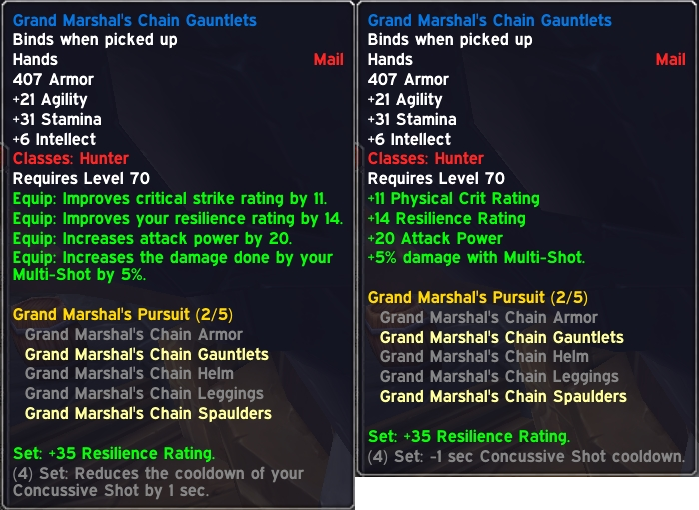
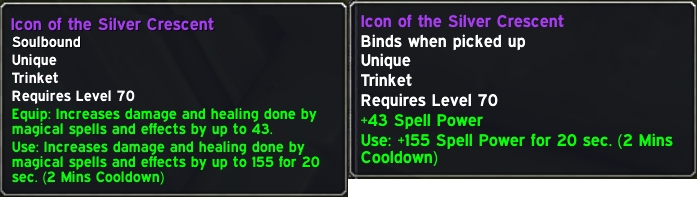
ZeraTooltip aims to make stats on item tooltips easier to read at a glance. It’s extremely customizable.
This addon is all about UI, so its features are best explained with a demonstration. Here’s a short video (1m20s) that shows some of the main settings.
There are also some pictures in the Images section.
Rewording
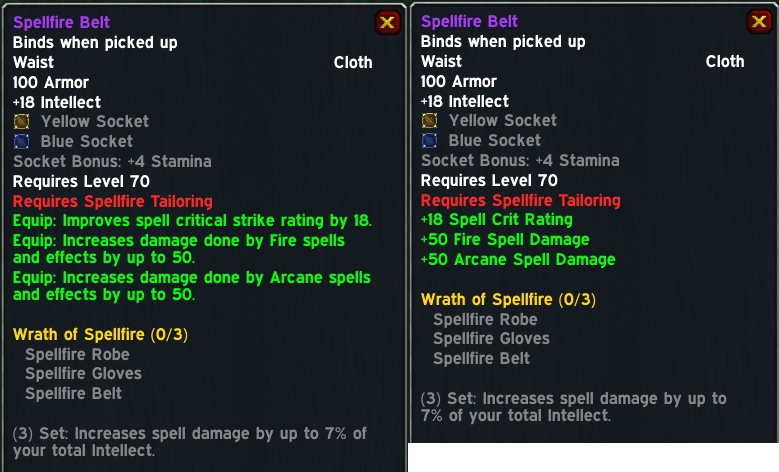
One of the main features of ZeraTooltip is its ability to reword lines. This results in shorter tooltips that are easier to understand at a glance.
For example:
“Improves hit rating by 10”
Can be reworded to:
“+10 Hit”
You can set custom text if you prefer. It’s even possible to do this:
“Restores 10 mana per 5 sec.” -> “+120 Mana per Minute”
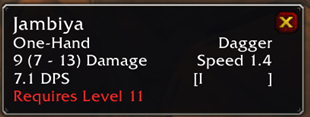
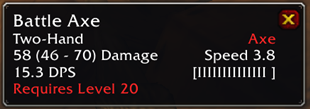
There’s also an option to display a “weapon speed bar” which is a visual indicator of weapon speed. It can go beside or below the speed number.
Reordering
ZeraTooltip ensures that stats appear in a consistent order. The order may be customized, or you can disable the reordering entirrely.
For example, here is the default order of base stats:
+Stamina
+Strength
+Agility
+Intellect
+Spirit
+Resist
Secondary stats (such as spell power) may also be sorted.
Recoloring
ZeraTooltip can give any stat any color. Every color may be customized or disabled.
It’s also possible to set a color which applies to gear that your character may learn to equip from a weapon/class trainer. This changes the default red text which would appear on items that can’t be equipped. Note the orange text in the example below, which indicates that the item is possible to equip only after further training (assuming other requirements are also met, such as character level).

How to Help
If you find a tooltip that doesn’t look right or if you have any other feedback/suggestions, then you can let me know by submitting an issue HERE.
If you’re interested in helping to localize this addon for other languages, you can check out the Localization section to get started. To complete the process, contact me through direct message on AddonsWoW or by submitting an issue above.
Add a comment