


 Get 0.05 TON 💎
Earlier Versions
| Name | Size | Uploaded | Game Version | Downloads | |
| v1.0.3 release | 2.88 KB | Jan 24, 2023 | 10.0.5 | 186 |  Download Download |
| v1.0.2 release | 2.85 KB | Nov 30, 2022 | 10.0.2 | 215 | Download |
| v1.0.1 release | 2.81 KB | Nov 15, 2022 | 10.0.2 | 101 | Download |
| v1.0.0 release | 2.81 KB | Nov 11, 2022 | 10.0.0 | 22 | Download |
Screenshots
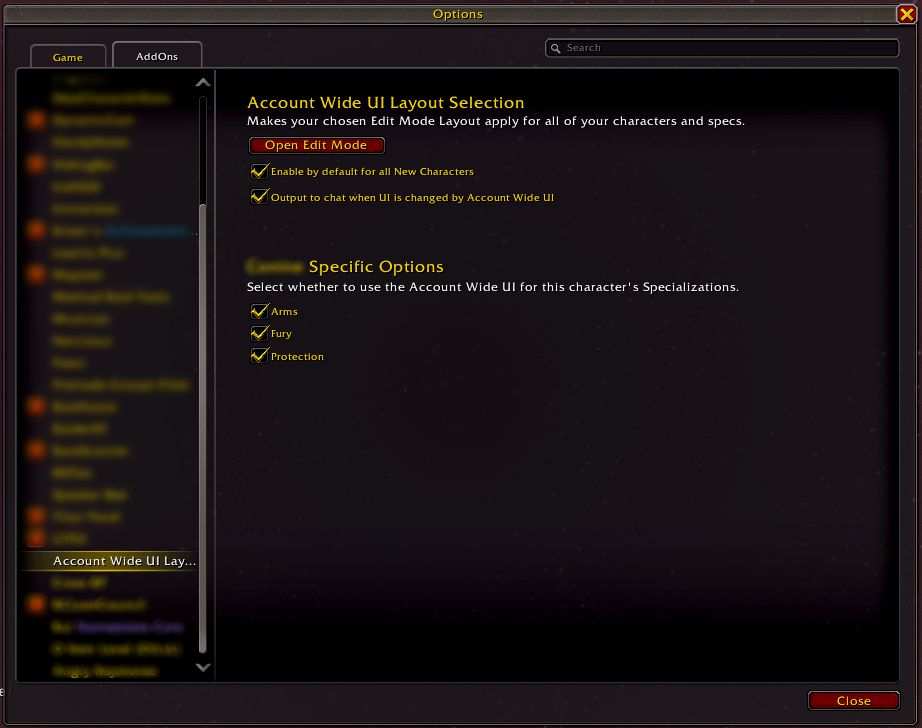
Description
This addon allows you to use the same UI Layout you’ve created in Edit Mode across all your characters and specs automatically, without needing to select it manually every time.
Configuration
Your chosen Edit Mode UI is saved as the Account Wide UI automatically after exiting Edit Mode (unless you have disabled it for your spec as explained below).
You can configure the addon by typing /accwideui into chat.
- You can toggle whether the Account Wide UI applies automatically to all new characters (or chars you haven’t yet logged into after installing the addon).
- You can toggle whether text is written into chat when the Addon sets your UI Layout.
- You can toggle whether the Account Wide UI is used on any or all specs. You’ll need to do this for every character.
![SinStats [ Live Stats ]](https://addonswow.com/wp-content/themes/addonswow.com/addons/sinstats-live-stats/screenshots/sinstats-live-stats-scr-1-mini.png)

![SinStats [ Classic / TBC Stats ]](https://addonswow.com/wp-content/themes/addonswow.com/addons/sinstats-classic-tbc-stats/screenshots/sinstats-classic-tbc-stats-scr-1-mini.jpg)


Add a comment