


 Get 0.05 TON 💎
Earlier Versions
| Name | Size | Uploaded | Game Version | Downloads | |
| ChaChing V3.0 release | 68.24 KB | Nov 18, 2019 | 1.13.2 | 62 |  Download Download |
Screenshots
Description
- – Sell all poor quality (i.e., grey) items. This is the default, but the player can turn this option off
- – Sell all common quality (i.e., white) armor or weapons items. ChaChing also supports the ability to exclude certain white items
- such as skinning knives, fishing poles, arclight spanners, etc., from being sold
- – Sell all items, regardless of type or quality, by selecting a bag in which ALL items in that bag will be sold.
- (1) Press ESC to call up Blizzard's in-game menu, click on the [Interface Options] tab, click the [AddOns] tab, and then select ChaChing from the list of AddOn.
- (2) Issue the "/cc config" command in the game's Chat box.
- The following configuration options are available:
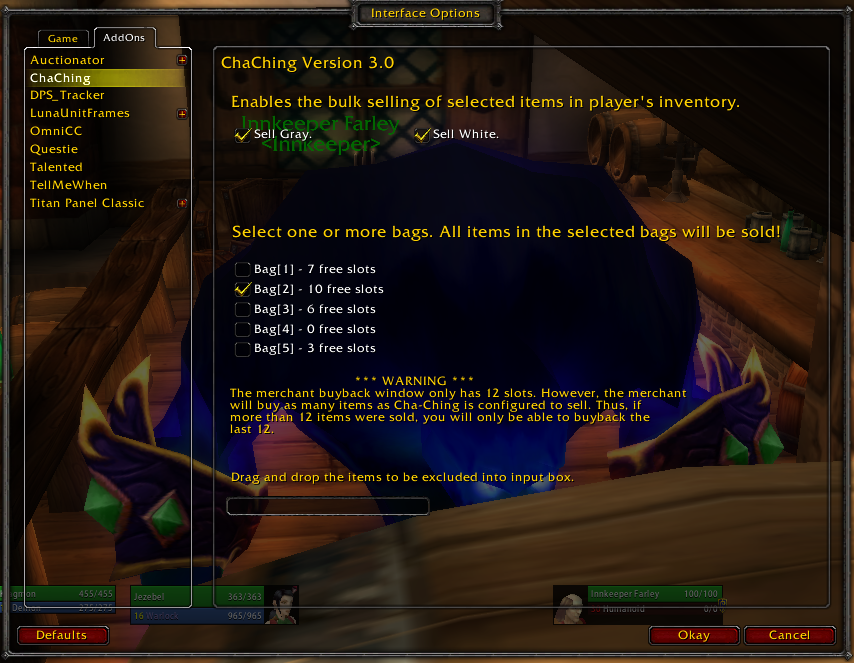
– Two checkboxes, [Sell Gray] and [Sell White] item. The latter only sells common quality Armor and Weapons.
– Five inventory bag checkboxes, one for each bag slot. Checking any checkbox instructs ChaChing to sell each and every item in that bag.
- Excluding selected items: if a player wants to prevent ChaChing from ever selling an item, the player must drop and drag the item to the Entry Box. This will place the item in a table of items that will not be sold. For example, most of us have a common (white) quality fishing pole. You should place all such needed items in the table of items not to be sold.
- PLAYER EXITING AND UI RELOADS:
– All items residing on the exclusion table are retained across game essions (i.e., UI Reload and player logout/login events). At present, items cannot be removed individually from the exclusion list. Rather, the exclusion list must be cleared of all items. To do this, click the [Remove Entries] button on the Excluded Items dialog ("cc showtable").
– If the [Sell Grey] box is cleared (i.e., unchecked), upon UI Reload or player logout, the [Sell Grey] checkbox will again be checked when the player enters the game world.
– If the [Sell White] box is checked, it will remain checked until the player manually unchecks it. In other words, the state of the [Sell White] checkbox is retained across UI reloads and login/logout events.
– [Bag] selections are not retained when the player across game sessions. Upon reentering the game world, the [Sell White] button will be unchecked as will all bags.


![Titan Panel [Farm Buddy]](https://addonswow.com/wp-content/themes/addonswow.com/addons/titan-panel-farm-buddy/screenshots/titan-panel-farm-buddy-scr-1-mini.jpg)


Add a comment