


 Get 0.05 TON 💎
Earlier Versions
| Name | Size | Uploaded | Game Version | Downloads | |
| v1.5 release | 12.65 KB | Dec 16, 2022 | 10.0.2 | 283 |  Download Download |
| v1.4 release | 10.63 KB | Nov 16, 2022 | 10.0.2 | 242 | Download |
| v1.3 release | 9.35 KB | Nov 16, 2022 | 10.0.2 | 67 | Download |
| v1.2 release | 9.29 KB | Oct 26, 2022 | 10.0.0 | 151 | Download |
| v1.1 release | 9.21 KB | Aug 13, 2022 | 9.2.5 | 77 | Download |
| v1.0 release | 8.77 KB | May 19, 2022 | 9.2.0 | 103 | Download |
Screenshots
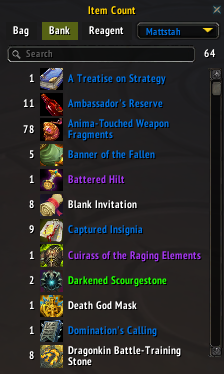


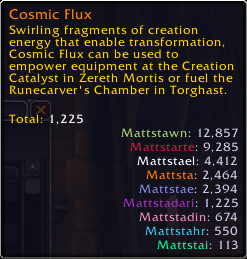
Description
Track item counts for items in your bags, bank and reagent storage across all your characters.
Item Tooltips:
- Item tooltips will display the counts for bags, bank and reagent storage.
- Holding left-alt will update the tooltip to also show counts for other characters on the realm if they have at least 1 of the item.
- The options menu in the default Blizzard Interface -> Addons window allows changing how the counts are displayed and how the list of other characters are sorted.
Dedicated UI:
- Using the slash command ‘/itemcount’ will open a window allowing looking at the items in bags, bank and reagent storage.
- A dropdown menu will allow swapping the displayed list to items held by other characters on the realm.
Currency Tooltips:
- Holding left-alt will update the tooltip to show currency count for other characters on the realm if they have at least 1 of the currency.
- Hovering over the gold amounts at the bottom of the bags will display gold counts for characters on the realm. (This tooltip can be disabled in the addon options.)
In order to collect the item counts for other characters, you will need to log into that character once to update the bag, reagent storage and currency counts. Bank counts cannot be collected until the bank is visited and opened on each character. A red warning will display on the character telling them to visit the bank to update counts. This warning will show as a red X in the other character counts and will cause that character to show for all items even if they don’t hold any of that item. The red X signifies you should log on to that character and visit the bank to collect their bank counts.





Add a comment